In order to report on or enter data for a fixed re-useable Location it must first exist in the Indicia Warehouse. If a shapefile is desired then the shapefile can be imported so long as it contains the appropriate fields as attributes. The shapefile must be packaged as a zip file and will add location geometry to the Location. Locations can also be added or updated without geometry from a csv import.
The overview instructions for the process can be found here: https://indicia-docs.readthedocs.io/en/latest/administrating/importing-shp.html
It is important to note that the only field used to match locations is the location name while it is suggested that the field code or id might be used, this is not the case and they fail to identify and update any matches. It is therefore important to get the location name correct on import. If importing for the first time then any custom fields must be created in the warehouse prior to the import.
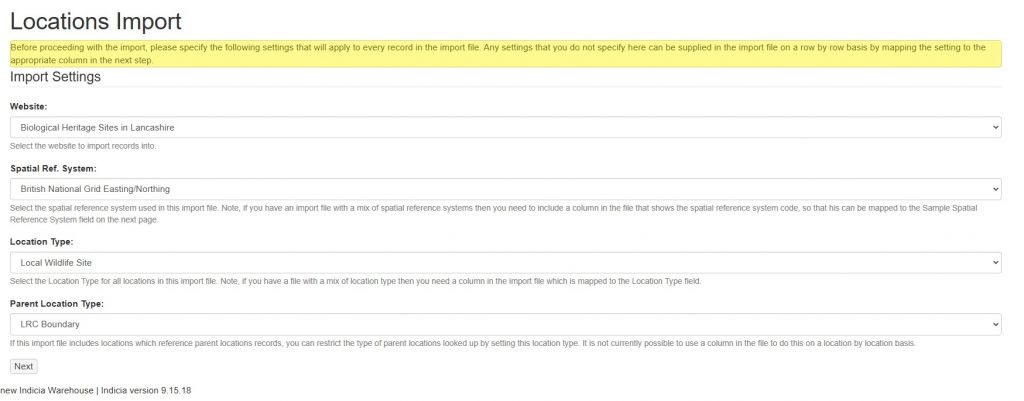
The first import step sets meta fields for the import. These include the Website, Spatial Reference System, Location Type, and Parent Location Type. Note that the Location Type can be overridden in the file attributes where you have a mix of location types.
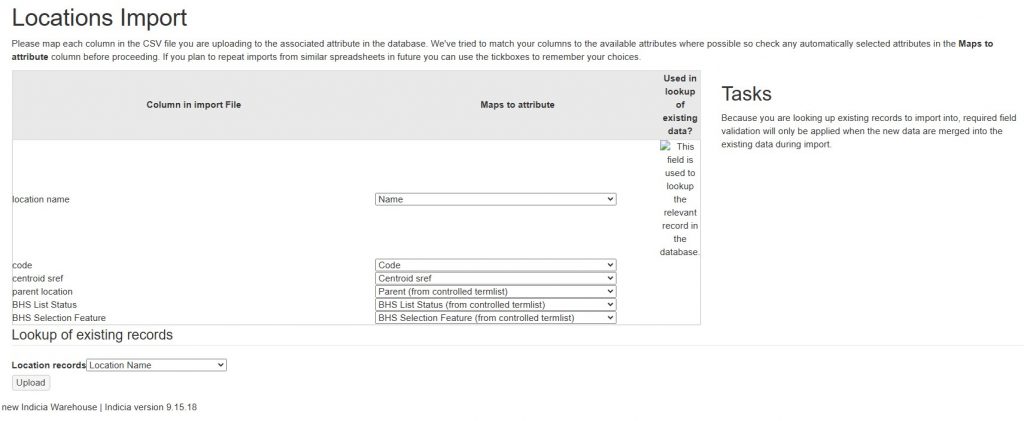
The second step involves matching file attributes to the location fields. Where you are updating an existing location the location name must match. Any location attributes can be updated in this manner, including custom attributes although they must exist prior to the import.
However, supplied values must be legal. If you have a custom field such as ‘BHS Status’ which uses lookup values then the imported value must be on the lookup list.
The import will number of fields including as basic Name, Code, Comment, Centroid, External Key, Location Type and any parent information (e.g. Parent name and Parent type). Name is the locations name field and used for database matching. It is also the field which will be used in any lookup iform you create later.


 using WordPress and
No responses yet